What Is Business Synergy Suite?
Business Synergy Suite is Woongjin’s portfolio of solutions that extends business capabilities across HR, finance, projects, automation, and executive information. Each solution can be implemented independently or integrated with ERP, groupware, electronic approval, and accounting systems.
Extend Core ERP Data into Day-to-Day Operations
Built on core ERP data, the suite connects the capabilities required for expense documentation, internal control, asset verification, project profitability, HR operations, and management reporting. Organizations can retain their existing systems, expand capabilities in phases, and improve processing speed and data usability.
Why It Matters Why Your Business Needs BSS
Disconnected data, manual processes, delayed reporting, and increasing control overhead remain common across enterprise operations.
Woongjin’s solutions connect ERP data with operational workflows to improve efficiency and management visibility.
Fragmented Business Data
Connect data scattered across departmental systems and spreadsheets to reduce duplicate entry and manual validation.
Disconnected ERP and Operational Workflows
Extend ERP with domain-specific solutions for approvals, evidence, performance, reporting, and control processes that ERP alone may not fully address.
Scalable Operations with Stronger Internal Controls
Implement priority capabilities in phases while strengthening controls based on access rights, approvals, evidence, and change histories.
Solutions in the Portfolio
The suite comprises seven solutions across HR and organization, finance and internal control, project and productivity, and executive information and analytics. Each solution can operate independently or integrate with existing systems.
HR & Organization Management
Executive Information & Analytics
Finance & Internal Control
Project & Business Productivity
Differentiators
BSS provides a modular, extensible solution framework that integrates with existing enterprise systems and expands as business needs evolve.
Modular Solution Portfolio
Adopt the solutions your organization needs and add more capabilities as requirements evolve.
Seamless System Integration
Integrate with ERP, groupware, approval workflows, and accounting systems.
Connected Data Flows
Link data across workflows to reduce manual processing and duplicate entry.
Built-in Controls and Audit Trails
Strengthen operational controls through role-based access, approvals, supporting evidence, and change logs.
Phased, Scalable Expansion
Start with priority areas and expand capabilities in phases as business needs evolve.
WHRMWoongjin Human Resource Management
Connect Core HR, Time and Attendance, and Payroll to Improve Accuracy and Efficiency
WHRM is Woongjin’s integrated HR management solution for core HR, time and attendance, payroll, performance, learning, and compensation. By centralizing HR data around a unified employee master and standardizing recurring workflows, WHRM improves the accuracy, consistency, and efficiency of HR operations.
What Challenges Does WHRM Address?
HR data is often fragmented across separate systems and spreadsheets, making it difficult to maintain consistency across core HR, time and attendance, payroll, and performance processes. WHRM centralizes HR data and standardizes recurring workflows to reduce manual work, improve data accuracy, and strengthen operational reliability.
Unified HR Data
Centralize core HR, time and attendance, and payroll data around a unified employee master to reduce duplicate entry and inconsistencies..
Standardized HR Workflows
Reduce spreadsheet-based and manual work while standardizing recurring processes and approval workflows.
More Accurate Payroll Processing
Connect approved time and attendance data with payroll calculations to reduce validation effort and processing errors.
Secure Personal and Payroll Data
Protect sensitive HR data through role-based access, audit trails, and activity logs.
Connected HR Data
Across the Employee Lifecycle
WHRM connects HR data across the employee lifecycle, from recruitment through offboarding.
Data captured at each stage flows into the next, improving consistency and usability across HR operations.
Core HR
Time & Attendance
Payroll
Performance
Learning
Compensation
Offboarding
Key Features of WHRM
WHRM provides the core capabilities required for enterprise HR operations, centered on core HR, time and attendance, and payroll.
Core HR Management
Employee profiles, organization and job structures, personnel actions, employment history, contracts, and certificate management
Time & Attendance Management
Clock-in/out, leave, overtime, night and holiday work, approvals, and attendance aggregation
Payroll Management
Salary and bonus calculations, statutory deductions, income tax, year-end tax settlement, and payslip management
Performance Management
Goal setting, evaluation plans, evaluation results, and integration with promotion and compensation
Learning & Competency Management
Learning plans, course history, learning results, and competency development
Compensation & Benefits
Incentives, benefit applications, and final settlement upon termination
HR Dashboard
Workforce, attendance, labor cost, turnover, and organization-level HR metrics
WHRM Differentiators
WHRM goes beyond task automation by aligning HR processes with each organization’s policies and existing IT environment.
Modular Architecture
Implement the capabilities you need across core HR, time and attendance, payroll, performance, learning, and compensation.
Seamless System Integration
Integrate with ERP, groupware, electronic approval, and accounting systems, or deploy WHRM as a standalone HR platform.
Actionable HR Insights
Support decision-making with key metrics such as workforce levels, attendance, labor costs, and turnover.
Security & Business Benefits
Designed for the sensitivity of employee and payroll data, WHRM provides role-based security while improving HR efficiency and data reliability.
Role-Based Security
Set access permissions by user role and job responsibility, with complete audit trails and activity logs.
Operational Efficiency
Connect core HR, time and attendance, and payroll in one workflow to reduce repetitive work and manual validation.
Improved Data Accuracy
Reduce duplicate entry and manual errors to increase the reliability of HR data.
Organizations That Benefit from WHRM
WHRM is designed for organizations seeking to unify HR data, reduce manual processes, and modernize HR operations in phases.
Disconnected HR Systems
Unify core HR, time and attendance, and payroll data around a common employee master.
Spreadsheet-Heavy HR Operations
Reduce manual work and duplicate entry to improve process accuracy and efficiency.
Frequent Payroll and Attendance Errors
Strengthen the connection between approved attendance data and payroll calculations.
Limited Access to HR Metrics
Give managers faster access to workforce, attendance, labor cost, and turnover insights.
Phased HR Modernization Needs
Start with priority capabilities and expand the HR system as business needs evolve.
ERP Environments Requiring Deeper HR Capabilities
Add specialized HR functionality while retaining and integrating with the existing ERP.
WICSWoongjin Internal Control System
Structure ICFR Controls, Evidence, and Audit Histories to Streamline Audit Preparation and Response
WICS is Woongjin’s internal control solution for materiality assessment, scoping, control design, assessment, evidence management, and audit response across internal control over financial reporting (ICFR). By connecting account, process, control, evidence, and assessment data through the RCM, WICS enables organizations to track control status and the full history of audit preparation and response.
What Challenges Does WICS Address?
Many organizations still manage ICFR through spreadsheets, standalone documents, and manually collected evidence. WICS connects ICFR data through the RCM (Risk Control Matrix), enabling traceable management of control activities, assessments, evidence, deficiencies, and remediation actions.
Structured Scoping Management
Manage account- and process-based materiality assessments and define ICFR scope in a structured workflow.
Connected RCM, Assessments, and Evidence
Link control descriptions, assessment results, evidence, and deficiencies in one workflow.
ERP and External System Integration
Streamline population and evidence management to reduce the effort required to prepare audit materials.
Extended IT Controls and Access Governance
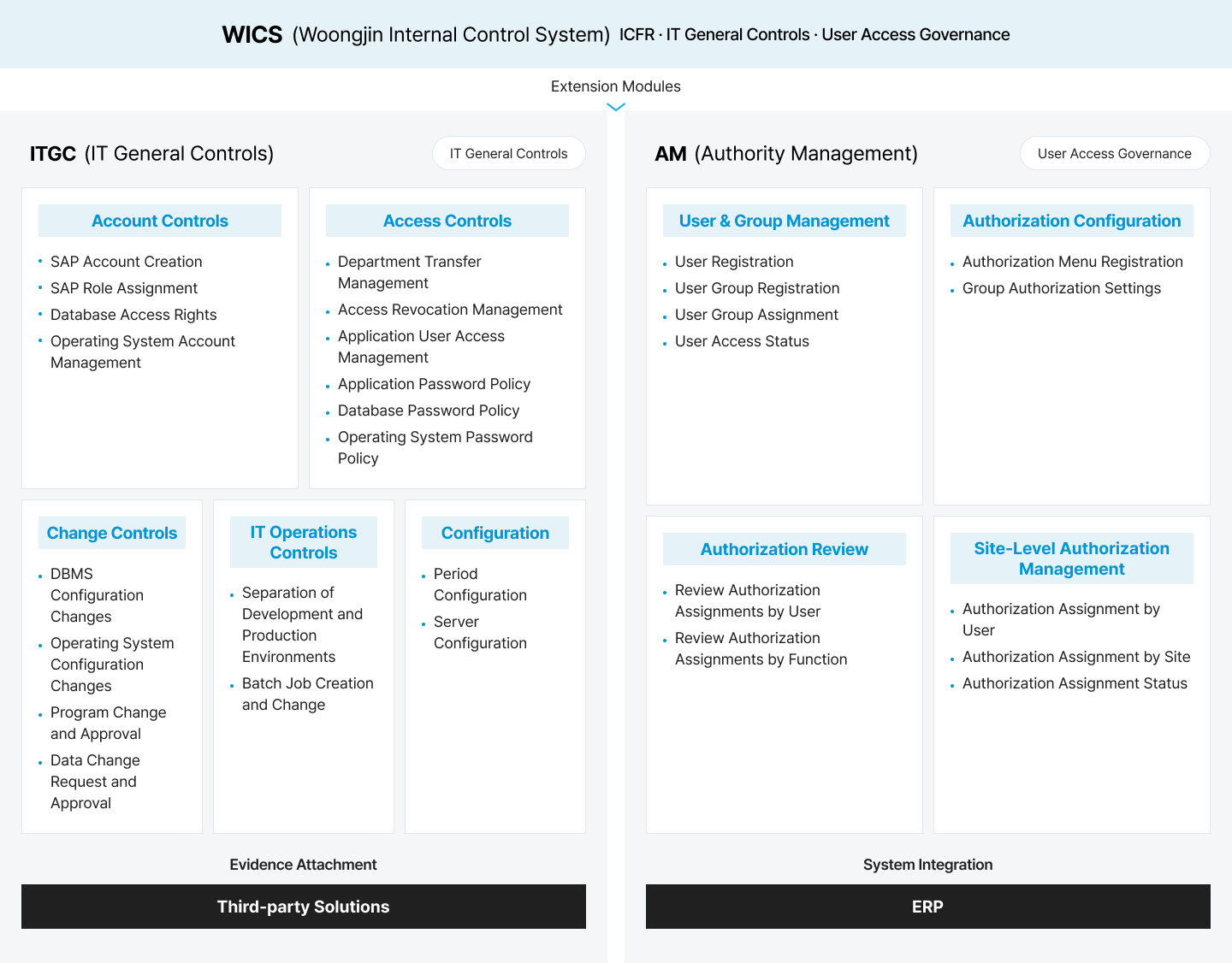
Extend control coverage to access controls, change controls, and user access governance through the ITGC and AM modules.
A Traceable
ICFR Operating Framework
WICS connects each stage of ICFR operations. Scoping results inform control design and assessment scope, while assessment results flow into deficiency management and remediation actions.
Materiality Assessment
Scoping
Control Descriptions & RCM
Assessment
Evidence
Deficiency Management
Audit Response
Key Features of WICS
WICS provides control management, scoping, assessment, electronic evidence, risk management, and audit response capabilities for ICFR operations.
Control Management
Control design, control activities, operating status, and RCM management
Scoping Management
Account- and process-based materiality assessment and ICFR scope definition
Assessment Management
Design and operating effectiveness assessments, IPE and MRC assessments, and deficiency management
Electronic Evidence Management
Evidence upload, evidence history tracking, and change history management
Risk Management
Exception analysis, control deficiency management, and remediation action management
Audit Response
Audit request management and generation of audit reports and operating-result reports
Dashboard
Visualization of control status, assessment progress, and deficiencies
System Integration
Integration with ERP and external systems, including population and evidence data management
RCM: Risk Control Matrix / IPE: Information Produced by Entity / MRC: Management Review Control
ITGC & AM Extension Modules
Building on its ICFR foundation, WICS extends control coverage to IT general controls and user access governance. The ITGC and AM modules integrate with external systems and ERP to manage control execution and authorization histories.
WICS Differentiators
WICS turns fragmented ICFR recordkeeping into a connected operating framework spanning control design, assessment, evidence, and audit response.
End-to-End ICFR Management
Connect materiality assessment, scoping, control design, assessment, evidence, deficiency management, and audit response in one workflow.
ERP and External System Integration
Streamline population and evidence management and prepare audit materials through a structured, repeatable process.
Stronger Audit Traceability
Manage audit requests, assessment results, evidence, and reports together, with traceable creation, modification, and submission histories.
Security & Business Benefits
WICS provides role-based security for sensitive financial and control data while standardizing ICFR operations and improving audit readiness.
Role-Based Security
Set access permissions by user role and business scope, with complete histories of data creation, modification, and approval.
Standardized ICFR Operations
Manage materiality assessment, scoping, assessment, evidence, and audit procedures through a consistent framework.
More Efficient Audit Preparation
Organize audit requests, evidence, and reports to reduce repetitive data collection and preparation effort.
Organizations That Benefit from WICS
WICS is designed for organizations seeking to standardize ICFR operations and establish a structured framework for controls, evidence, and audit response.
Active ICFR Programs
Standardize internal control activities and maintain clear visibility into operating status.
High Audit Preparation Workloads
Prepare audit requests, evidence, and reports more efficiently.
Fragmented Control and Evidence Management
Connect assessment, evidence, and deficiency data through the RCM.
ERP-Based Internal Control Expansion
Link ERP data with internal control processes to strengthen control coverage.
ITGC Management Requirements
Manage access, change, and IT operations controls in a structured framework.
Critical User Access Governance
Maintain transparent, traceable histories of access assignment, modification, and revocation.
WEVSWoongjin Easy Voucher System
Connect Expense Requests, Approvals, Journal Vouchers, and ERP Posting for Greater Transparency and Financial Control
WEVS is Woongjin’s expense management solution for expense entry, digital supporting documents, journal voucher processing, budget management, and ERP posting. It captures expenses from cash receipts, tax invoices, corporate card transactions, and purchasing data, then connects approval workflows and ERP integration to streamline expense processing and financial posting.
What Challenges Does WEVS Address?
Expense and journal voucher processes are often fragmented across supporting document collection, expense entry, approvals, voucher processing, and budget checks. WEVS connects expense, document, voucher, and budget data to improve processing accuracy and financial visibility.
Streamlined Expense Entry
Standardize expense entry and approval workflows around digital supporting documents.
Connected Supporting Documents and Voucher Records
Manage supporting documents, journal vouchers, and approval histories within a single expense workflow.
Real-Time Budget Visibility
Review budget-to-actual performance by department, project, and account to strengthen expense control.
Faster ERP Voucher Processing
Connect expense and voucher data directly to ERP financial processing.
A Connected Workflow from
Expense Request to ERP Posting
Expenses captured from supporting documents move through approval and journal voucher processing before being posted to ERP as accounting data. Budget execution can be reviewed by department, project, and account, improving financial visibility and control.
Expense Entry
Electronic Approval
Budget Check
Journal Voucher Processing
ERP Posting
Expense Analysis
Key Features of WEVS
WEVS provides expense entry, digital supporting document management, electronic approval, journal voucher processing, budget management, and ERP posting capabilities.
Expense Entry
Registration of expense types including cash receipts, tax invoices, corporate card transactions, and purchasing data
Digital Supporting Document Management
Supporting document upload, history management, and linkage to expense vouchers
Electronic Approval Integration
Integration with groupware-based approval workflows and approval status management
Journal Voucher Processing
Journal voucher creation based on expense data and streamlined voucher processing
Budget Management
Budget setup and change management by organization, department, and project
Expense Monitoring
Expense execution status by department, project, and account
ERP Posting Integration
Integration of expense and voucher data with ERP for financial posting
Dashboard
Visualization of budget-to-actual performance, expense trends, and voucher processing status
WEVS Differentiators
WEVS connects supporting documents, expense requests, approvals, journal vouchers, and ERP posting in one end-to-end financial workflow.
Supporting Document-Driven Expense Processing
Connect expense entry, approvals, and journal voucher processing around supporting documents to improve transparency and traceability.
ERP and Groupware Integration
Connect ERP, groupware, and electronic approval systems to maintain a continuous expense workflow.
Department- and Project-Level Expense Control
Manage expense execution by organization, department, project, and account, with clear budget-to-actual visibility.
Business Benefits
WEVS improves expense processing speed, journal voucher accuracy, budget control, and financial visibility.
Faster Expense Processing
Reduce repetitive work across expense entry, approvals, and journal voucher processing.
More Accurate Journal Vouchers
Reduce entry errors and omissions through supporting document-based expense management.
Stronger Budget Control
Monitor budget-to-actual execution by department, project, and account.
Organizations That Benefit from WEVS
WEVS is designed for organizations seeking to streamline expense and journal voucher workflows and strengthen the connection between supporting documents and ERP posting.
Manual Expense and Voucher Processes
Streamline supporting document collection, expense entry, approvals, and journal voucher processing.
Fragmented Supporting Documents
Connect expense documentation and voucher histories within a single workflow.
Detailed Department or Project Expense Control
Review budget-to-actual execution at a granular level.
ERP-Integrated Expense Management
Connect expense data directly with ERP voucher processing.
Stronger Financial Transparency
Manage expense policies and approval histories systematically.
FAMSFixed Asset Management System
Align Physical Assets with Book Records to Improve Asset Accuracy and Financial Reporting
FAMS is Woongjin’s fixed asset management solution for the full lifecycle of tangible and intangible assets—from registration and transfer to valuation, depreciation, maintenance, physical verification, and disposal. QR code, barcode, and RFID-based verification, combined with ERP integration, keeps physical assets and book records aligned.
What Challenges Does FAMS Address?
Many organizations still rely on spreadsheets, manual ledgers, and on-site checks for asset management. FAMS connects physical verification and accounting processes around standardized asset master data, improving asset accuracy and financial reporting reliability.
Mobile Physical Asset Verification
Reduce on-site verification effort with mobile asset checks using QR codes, barcodes, and RFID.
Alignment of Physical Assets and Book Records
Reduce discrepancies between physical assets and book records through standardized asset master data.
Traceable Asset Movement and Changes
Track acquisition, transfer, change, repair, disposal, and retirement histories.
Depreciation and Accounting Integration
Improve accounting accuracy through standards-based depreciation calculations and ERP integration.
Asset Lifecycle Management
That Keeps Physical Assets and Book Records Aligned
Asset registration data supports physical verification and depreciation calculations, while transfer histories can be reflected in department-level asset status and accounting processes. This enables full traceability from acquisition through disposal.
Asset Registration
Assignment & Transfer
Valuation & Depreciation
Maintenance
Physical Verification
Disposal & Retirement
Reporting & Analytics
Key Features of FAMS
FAMS provides asset registration, lifecycle history, depreciation, ERP integration, mobile verification, maintenance, disposal, and reporting capabilities.
Asset Registration
Registration of tangible and intangible assets, acquisition information, asset classes, locations, and asset custodians
Asset Lifecycle History
Lifecycle history for acquisition, transfer, change, repair, disposal, and retirement
Depreciation Management
Standards-based depreciation calculations, asset valuation, and depreciation expense management
Accounting & ERP Integration
Integration of asset acquisition, depreciation, and disposal data with ERP and accounting systems
Groupware &
Electronic Approval Integration
Approval workflows and approval histories for asset acquisition, transfer, change, and disposal
Mobile Asset Verification
Asset lookup and physical verification using QR codes, barcodes, and RFID
Maintenance Management
Preventive maintenance plans, repair requests, and maintenance histories
Asset Disposal Management
Disposal requests for sale, retirement, or donation, including related gain or loss recognition
Dashboards & Reports
Visualization of asset status, depreciation trends, maintenance costs, and physical verification results
FAMS Differentiators
FAMS connects physical asset status with accounting data to improve the reliability of asset management and financial reporting.
Unified Tangible and Intangible Asset Management
Manage buildings, equipment, office assets, and vehicles alongside software, licenses, and other intangible assets.
Mobile Verification with QR, Barcode, and RFID
Look up and verify asset information on site to reduce manual inventory effort and improve physical checks.
Accurate Depreciation and Accounting Integration
Connect depreciation, asset movement, and disposal data with ERP and accounting systems to improve financial data accuracy.
Business Benefits
FAMS improves asset data accuracy, verification efficiency, accounting accuracy, and lifecycle traceability.
Improved Asset Accuracy
Manage physical assets and book records under consistent standards.
More Efficient Asset Verification
Reduce the burden of on-site checks with QR, barcode, and RFID-based verification.
More Reliable Financial Reporting
Connect asset and accounting data to improve reporting accuracy.
Organizations That Benefit from FAMS
FAMS is designed for organizations with large asset portfolios or a strong need to maintain consistency between physical assets and book records.
Large, Distributed Asset Portfolios
Manage asset locations, custodians, and usage status systematically.
Combined Tangible and Intangible Asset Management
Manage equipment, office assets, vehicles, software, and licenses together.
High Physical Verification Workloads
Improve on-site efficiency with QR, barcode, or RFID-based verification.
Gaps Between Physical Assets and Book Records
Improve asset data consistency and financial reporting reliability.
ERP-Based Asset Management Expansion
Integrate depreciation, asset movement, and disposal data with ERP.
WPMSWoongjin Project Management System
Unify Project Schedules, Costs, and Profitability to Reduce Delivery and Margin Risk
WPMS is Woongjin’s project management solution for planning, execution, scheduling, cost, performance, closeout, and post-delivery service across diverse project types. It structures projects around the WBS and provides integrated visibility into project status, resource assignments, cost, revenue, and profitability.
What Challenges Does WPMS Address?
Project management is often fragmented across schedules, spreadsheets, standalone reports, and accounting systems. WPMS connects project data to provide a unified view of execution and cost, helping reduce schedule delays and cost overruns.
Unified Project Visibility
Review project status, schedules, and WBS performance in one place for faster visibility into progress.
WBS-Based Execution Standards
Standardize project work structures and execution criteria to clarify delivery scope.
Connected Cost, Revenue, and Profitability
Connect project costs, expenses, revenue, and profitability data to strengthen margin management.
Structured Closeout and Post-Delivery Service
Manage closeout, cost aggregation, profitability analysis, and post-delivery service histories.
WBS-Based Project Execution
and Cost Management
Project master and WBS data guide execution schedules and timesheet management, while labor hours and cost data feed into cost control and profitability analysis. This provides a unified view of project progress and economics.
Master Data
Project Master
Execution Management
Cost Management
Closeout Management
Post-Delivery Service
Key Features of WPMS
WPMS provides project master data, execution, cost, closeout, status, and post-delivery service management capabilities.
Master Data Management
Project codes, resource pools, standard templates, and authorization rules
Project Master
Management
Project profiles, delivery organizations, schedule plans, and WBS structures
Project Execution Management
Project schedules, WBS performance, timesheets, subcontracted services, and material inputs
Project Cost Management
Expense entry, cost aggregation, allocation, progress-based revenue recognition, and profitability status
Project Closeout Management
Budget-to-actual analysis, schedule changes, cost changes, closeout, and completion reporting
Project Status Management
Overall project status, progress, incurred costs, and budget-to-actual performance
Post-Delivery Service
After-sales and customer service requests, work orders, completion reporting, and service history management
Dashboards & Reports
Visualization of project schedules, costs, profitability, delivery status, and resource inputs
Project Management Perspectives
WPMS supports integrated project management across productivity, quality, cost, and delivery.
Productivity
Identify potential delays early by monitoring project schedules and progress
Quality
Manage project issues and execution data to address quality risks
Cost
Control budgets, costs, resource inputs, and profitability to prevent overruns
Delivery
Support on-time delivery through schedule, work progress, and delivery plan management
WPMS Differentiators
WPMS connects schedule, cost, profitability, delivery, and post-delivery service data to strengthen project execution.
WBS-Based Project Structure
Structure projects around the WBS to manage schedules, costs, resources, and performance systematically.
Project Cost and Profitability Visibility
Manage project expenses, revenue, labor hours, subcontracting, and material costs together for a clear view of profitability.
End-to-End Management from Project Award to Delivery and Service
Manage planning, execution, cost, closeout, and post-delivery service in one system after project award.
Business Benefits
WPMS improves project visibility, cost and profitability control, schedule and delivery management, and cross-functional collaboration.
Improved Project Visibility
View schedules, progress, costs, profitability, and delivery status in one place.
Stronger Cost and Profitability Management
Analyze project profitability using cost, revenue, and resource input data.
Improved Schedule and Delivery Management
Manage project schedules and work progress to address delivery risk.
Organizations That Benefit from WPMS
WPMS is designed for project-based organizations that need to manage schedules, costs, delivery, and post-delivery service together.
Project-Based Businesses
Manage schedules, costs, and profitability by project.
Order-to-Delivery Operations
Structure the full process from order and execution through delivery and post-delivery service.
Project Cost Management Requirements
Capture labor, subcontracting, material, and other project costs accurately.
WBS-Based Management Needs
Standardize project work structures and execution criteria.
ERP-Based Project Management Expansion
Integrate project execution data with accounting and cost data.
Post-Delivery Service Management
Manage service requests, work orders, and completion histories after delivery.
WRPAWoongjin Robotic Process Automation
Automate Repetitive Data Entry, Retrieval, Validation, and Reporting to Reduce Processing Time and Human Error
WRPA is Woongjin’s RPA solution for automating repetitive, rule-based work with software bots. It automates data entry, retrieval, validation, transfer, and reporting across ERP, web systems, spreadsheets, email, and file-based processes to improve speed and accuracy.
What Challenges Does WRPA Address?
Many organizations still handle recurring data entry, retrieval, consolidation, validation, and reporting manually. WRPA automates these tasks to reduce processing time and improve accuracy and productivity.
Automated Data Processing Across Systems
Automate repetitive data copying and entry between ERP, web systems, spreadsheets, and other applications.
Automated Recurring Reporting
Automate report generation, data consolidation, and file organization to reduce recurring reporting effort.
Automated High-Volume Data Validation
Automate rule-based comparisons, missing-data checks, and error identification.
Centralized Automation Operations
Monitor bot status, schedules, logs, and exceptions in one place.
An RPA Delivery Framework
from Process Discovery to Operations
During process analysis, automation feasibility and expected impact are assessed. Human procedures are then translated into executable bot scenarios, developed, tested, validated, and deployed to production.
Process Analysis
Process Design
Bot Development
Testing & Validation
Deployment & Operations
Monitoring
Maintenance
Key Features of WRPA
WRPA supports the full automation lifecycle, from opportunity discovery and bot development to execution, operations management, monitoring, and reporting.
Business Process
Analysis
Automation opportunity discovery, process analysis, and feasibility assessment
Process Design
Workflow definition, automation scenario design, and exception-handling rules
Bot Development
Bot development for data entry, retrieval, validation, transfer, and file processing
Execution Management
Bot execution, scheduling, and work status management
Bot Operations Management
Bot deployment, execution schedules, resources, and work queues
Monitoring
Monitoring of execution status, results, errors, and exceptions
Reporting
Automation results, transaction volumes, errors, and operational performance reports
System Integration
Integration with ERP, web systems, spreadsheets, email, groupware, and other applications
Automation Use Cases
WRPA can be introduced in phases, starting with high-frequency, rule-based processes.
ERP Processes
ERP data retrieval, entry, download, and recurring period-end close data collection
Finance & Reconciliation
Expense and reconciliation data consolidation, supporting document checks, and support for repetitive voucher entry
Reporting
Spreadsheet consolidation, recurring report generation, and data preparation
Validation
High-volume data comparison, missing-data checks, and error identification
Communications
Email distribution, attachment storage, and file-name standardization
WRPA Differentiators
WRPA identifies repetitive processes with high automation potential and provides a framework to operate and monitor deployed bots.
Automation Prioritized by Business Impact
Prioritize automation opportunities based on frequency, processing time, error potential, and business impact.
Minimal Changes to Existing Systems
Automate structured work across ERP, web systems, spreadsheets, email, and groupware while minimizing changes to the existing environment.
Centralized Bot Operations
Manage bot status, schedules, logs, and exceptions through a centralized operating framework.
Business Benefits
WRPA reduces repetitive processing time and human error while establishing a foundation for standardized automation operations.
Reduced Processing Time
Automate repetitive entry, retrieval, consolidation, and reporting.
Fewer Human Errors
Reduce entry errors and omissions through rules-based bot execution.
Lower Repetitive Processing Costs
Reduce the time and effort spent on recurring entry, retrieval, and consolidation.
Organizations That Benefit from WRPA
WRPA is designed for organizations with high volumes of repetitive work and frequent data movement across systems.
High-Volume Repetitive Work
Automate recurring data entry, retrieval, validation, and reporting.
Data Movement Across Multiple Systems
Reduce manual data transfer and processing across ERP and other systems.
Spreadsheet-Heavy Processes
Automate recurring file consolidation, data preparation, and reporting.
Frequent Errors and Processing Delays
Reduce errors, omissions, and delays caused by manual processes.
Digital Transformation Initiatives
Use automation to establish standardized, data-driven operations.
Phased Automation Rollouts
Start with high-impact processes and expand automation over time.
WEISWoongjin Executive Information System
Turn Enterprise Data into KPIs and Dashboards for Faster Executive Decision-Making
WEIS is Woongjin’s executive information system that integrates internal and external data to give executives an intuitive view of the information they need. It connects ERP and key business systems and can incorporate external indicators, presenting enterprise KPIs and core business metrics in a unified dashboard.
What Challenges Does WEIS Address?
In many organizations, management information is fragmented across departmental systems, spreadsheet reports, and standalone documents. WEIS brings enterprise data together under common definitions, then summarizes and visualizes key metrics to improve decision-making speed and accuracy.
Integrated Enterprise Data
Unify enterprise data under common definitions to reduce discrepancies across departmental metrics.
Reduced Reporting Effort
Deliver management metrics and KPIs through dashboards to reduce time spent consolidating data.
Faster Executive Visibility
Summarize and visualize key indicators so executives can understand current performance quickly.
Drill-Down Root-Cause Analysis
Move from summary indicators to detailed data to identify the causes behind performance changes.
An Enterprise Analytics Framework
for Executive Decision-Making
WEIS integrates internal and external data and delivers executive information through KPIs, dashboards, charts, and reports. This gives leaders rapid visibility into enterprise performance and helps them analyze the underlying causes of key issues.
Data Collection
Data Integration & Storage
Analytics & Transformation
Summarization & Visualization
Executive Decision Support
Key Features of WEIS
WEIS provides executive dashboards and analysis capabilities across finance, sales and marketing, HR and organization, production and operations, external indicators, drill-down analysis, and reporting.
Executive Dashboard
Enterprise KPIs, core business metrics, and role-specific executive views
Financial Analysis
Revenue, expenses, profitability, budget-to-actual performance, and profitability structure analysis
Sales & Marketing Analysis
Sales trends, customer metrics, sales performance, and campaign performance
HR & Organization Analysis
Workforce composition, labor costs, organization-level performance, and HR metrics
Production & Operations Analysis
Production status, operating efficiency, quality, and supply chain indicators
External Business Environment Analysis
Market trends, economic indicators, competitive conditions, and other external data
Drill-Down Analysis
Progressive analysis from summary indicators to detailed data
Report Management
Management reports, recurring reports, and metric-level analysis
WEIS Differentiators
WEIS goes beyond data lookup by integrating, summarizing, and analyzing the information executives need for decision-making.
Enterprise-Wide Integrated Analytics
Connect finance, sales, production, and HR data across departments to view enterprise performance under consistent definitions.
Executive-Centric Dashboards
Present KPIs and core indicators designed for fast executive judgment rather than exposing complex raw data directly.
Drill-Down Root-Cause Analysis
Move from summary indicators into detailed data to identify the causes of changes in revenue, costs, profitability, and operating metrics.
Internal and External Data Integration
Analyze internal business data alongside market, economic, and competitive indicators to support strategic decisions.
More Efficient Management Reporting
Manage recurring reports and management metrics systematically to reduce data consolidation and report preparation effort.
Strategy Execution Monitoring
Track strategic objectives and execution results continuously against enterprise KPIs and core business metrics.
Security & Business Benefits
WEIS provides role-based access to sensitive management information while increasing the usability and value of enterprise data.
Role-Based Data Access
Set access to sensitive financial, HR, and sales information based on user role and organizational level.
Faster Decision-Making
Give executives rapid access to core business metrics, reducing decision time and improving responsiveness.
More Efficient Management Reporting
Reduce data consolidation and report preparation effort while standardizing recurring reporting.
Data-Driven Strategy
Evaluate strategy execution and goal achievement against enterprise KPIs and core business metrics.
Improved Management Visibility
View revenue, expenses, profitability, workforce, production, and other key performance data in one place.
Stronger Risk Responsiveness
Identify metric changes and anomalies early to respond to management risks more quickly.
Organizations That Benefit from WEIS
WEIS is designed for organizations seeking to manage enterprise KPIs and business performance metrics under common definitions and build executive dashboards.
Enterprise KPI Management
Govern departmental KPIs and business performance metrics under common definitions.
Modernized Management Reporting
Reduce report preparation and data consolidation effort.
Strategic Use of ERP Data
Use ERP and internal system data for management analytics.
Data-Driven Management
Support major decisions with trusted data and metrics.
External Business Environment Monitoring
Analyze market, economic, and competitive indicators together.
Executive Dashboards
Give executives and senior leaders rapid visibility into key performance.